Facebook Instagram Twitter Youtube
  • EMPLOYEES RIGHTS
  • PROPERTY RIGHTS
  • FINANCE
  • SALARY
  • TAX
  • EPF
  • JOB
  • Authors and Team
    • Complaint Redressal
    • Contact US
    • Cookie Policy
    • Correction policy
    • Disclaimer
    • DNPA Code of Ethics
    • Fact-Checking Policy
    • Onwership and Funding
    • Privacy Policy
    • Terms of Service
Search
Sign in
Welcome! Log into your account
Forgot your password? Get help
Password recovery
Recover your password
A password will be e-mailed to you.
Rightsofemployees.com
- Advertisement -
  • EMPLOYEES RIGHTS
  • PROPERTY RIGHTS
  • FINANCE
  • SALARY
  • TAX
  • EPF
  • JOB
  • Authors and Team
    • Complaint Redressal
    • Contact US
    • Cookie Policy
    • Correction policy
    • Disclaimer
    • DNPA Code of Ethics
    • Fact-Checking Policy
    • Onwership and Funding
    • Privacy Policy
    • Terms of Service
Home EPF How to Download EPF Passbook? This is the easiest way to view...
  • EPF

How to Download EPF Passbook? This is the easiest way to view the e-statement – understand the step by step process

By
Pravesh Maurya
-
August 13, 2022
0
720
Facebook
Twitter
Pinterest
WhatsApp
Telegram
    - Advertisement -

    EPFO e-Statement Passbook download: Do you know how much money is deposited in your Employees’ Provident Fund (EPF) account? Do you know whether the EPF interest money has been credited to your account or not? Are you checking provident fund balance regularly? If not, then you need to keep an eye on your EPF account. EPF passbook (EPF e-statement) helps to know how much deduction can be claimed from the total income under section 80C. You can make this claim on your contribution.

    Add rightsofemployees.com as a Preferred Source

    Add rightsofemployees.comas a Preferred Source


    Registered member gets the benefit of passbook

    EPF passbook (EPFO e-statement) shows that the total amount has been deposited in the account due to the contribution made by you and your company. It helps in transferring the EPF account from the previous institution to the new institution. In the EPF passbook, the EPF account number, details of pension scheme, name and ID of the institution, details of the EPFO ​​office are given. To get the EPF passbook, it is necessary to register on the EPFO ​​website.

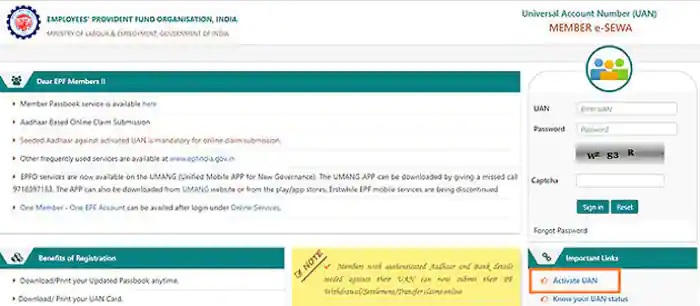
    How to register?

    1. Go to https://unifiedportal-mem.epfindia.gov.in/memberinterface/
    2. Click on Activate UAN (Universal Account Number).
    3. A new page will appear on your screen. Enter UAN, Aadhaar, PAN and other details. Remember that some information needs to be entered. They are marked with a red color asterisk.
    4. Click on ‘Get Authorization PIN’. A new page will appear on your screen. In this, you will be asked to verify the entered details. OTP will be sent to your mobile via SMS.
    5. Enter the OTP and click on ‘Validate OTP and Activate UAN’. On activation of UAN, you will get SMS with password. Use this password to log in to your account. You can change your password after logging in.
    6. Before downloading the EPF statement, remember that you will be able to see your passbook only after 6 hours of registration.

    Follow the steps to download the EPF statement…

    Step 1: Visit the website https://passbook.epfindia.gov.in/MemberPassBook/Login.jsp
    Step 2: Enter UAN, Password and Captcha code. Click on ‘Log-in’.
    Step 3: After logging in, select the member ID to view your passbook.
    The passbook is in PDF format, which can be easily downloaded.
    Keep in mind, passbooks of Exempted PF Trusts cannot be viewed. Such institutions themselves manage the PF trust.

    If you forget your account password, you can reset the password. For this, one has to visit the EPFO ​​member e-service website (https://unifiedportal-mem.epfindia.gov.in/memberinterface/).

    Add rightsofemployees.com as a Preferred Source

    Add rightsofemployees.com as a Preferred Source


    - Advertisement -
    • TAGS
    • Download EPF Passbook
    • Employees' Provident Fund
    • EPF PASSBOOK
    • EPFO e-Statement
    • Universal Account Number
    • view the e-statement
    Facebook
    Twitter
    Pinterest
    WhatsApp
    Telegram
      Previous articleNew BPL Ration Card List Released: New list of BPL ration card released, they got new ration card
      Next articleDelhi Metro ! Big News: Let’s park the car in the Delhi Metro parking! Will not be able to park for two days, know date and time
      Pravesh Maurya
      Pravesh Maurya
      https://www.rightsofemployees.com/
      Pravesh Maurya, has 5 years of experience in writing Finance Content, Entertainment news, Cricket and more. He has done BA in English. He loves to Play Sports and read books in free time. In case of any complain or feedback, please contact me @[email protected]
      Facebook Instagram Telegram Twitter Youtube

      Related ArticlesMore From Author

      EMPLOYEES RIGHTS

      Company Fines Staff ₹100 for Not Wearing Ethnic: Is It Legal?

      EMPLOYEES RIGHTS

      Elderly Care Leave: 30 Days for Central Staff

      EMPLOYEES RIGHTS

      NPS Rules Overhaul: 10 Key Changes

      Recent Posts

      • Company Fines Staff ₹100 for Not Wearing Ethnic: Is It Legal?
      • Elderly Care Leave: 30 Days for Central Staff
      • NPS Rules Overhaul: 10 Key Changes
      • EPF Transfer Warning: Why Skipping it Could Cost You Lakhs
      • IRCTC Luggage Rules: Pay 1.5x Fees for Extra Bags in Trains

      Read More

      Company Fines Staff ₹100 for Not Wearing Ethnic: Is It Legal?

      December 20, 2025

      Elderly Care Leave: 30 Days for Central Staff

      December 20, 2025

      NPS Rules Overhaul: 10 Key Changes

      December 20, 2025
      Changing jobs? Skipping your EPF transfer could cost you ₹1.66 lakh in taxes and interest. Learn how to consolidate accounts for a tax-free retirement.

      EPF Transfer Warning: Why Skipping it Could Cost You Lakhs

      December 20, 2025

      IRCTC Luggage Rules: Pay 1.5x Fees for Extra Bags in Trains

      December 20, 2025

      EDITOR PICKS

      Company Fines Staff ₹100 for Not Wearing Ethnic: Is It Legal?

      December 20, 2025

      Elderly Care Leave: 30 Days for Central Staff

      December 20, 2025

      NPS Rules Overhaul: 10 Key Changes

      December 20, 2025

      POPULAR POSTS

      Public holiday: Govt has declared September 17 as a public holiday....

      September 12, 2024

      School Closed: Govt declares all schools closed till January 15 after...

      December 28, 2024

      Govt Declares December 27 as a Public Holiday…Details Here

      December 26, 2024

      POPULAR CATEGORY

      • FINANCE15342
      • TAX786
      • EPF678
      • JOB249
      • PF156
      • PROVIDENT FUND80
      • PROPERTY RIGHTS69
      • EMPLOYEES RIGHTS69
      ABOUT US
      Rightsofemployees.com brings the Latest News & Top Breaking headlines on Politics and Current Affairs. Up-to-date news coverage, aggregated from sources all over the world by Rightsofemployees.com. Find latest news coverage of breaking news events, trending topics, and compelling articles.
      Contact us: [email protected]
      • Home
      • About us
      • Authors and Team
      • Contact US
      • Cookie Policy
      • Correction policy
      • Disclaimer
      • DNPA Code of Ethics
      • Fact-Checking Policy
      • Onwership and Funding
      • Privacy Policy
      • Terms of Service
      • Complaint Redressal
      © Copyright 2024 - Rightsofemployees.com Izon web Pvt. Ltd. All Rights Reserved. Contact US Izon Web Pvt. Ltd. Hno. 789, Basement, Dlf Phase 4 Sector 43, Gurgaon, Haryana -122009, Call: +91-9110801499, 0124-4941700
      Go to mobile version