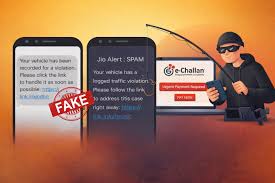
A sophisticated new cyber-fraud is targeting Indian vehicle owners in 2026. Scammers are sending high-pressure SMS and WhatsApp messages disguised as official traffic e-challans. These messages contain “phishing” links that lead to cloned government websites designed to steal your credit card details and OTPs.
Add rightsofemployees.com as a Preferred Source


Also Read | SBI New IMPS Rule: Don’t Get Charged for Online Transfers After Feb 15
In a recent case, a woman lost nearly ₹98,000 after clicking a link for a minor ₹590 fine. Here is how to spot the fake from the real and protect your savings.
How to Identify a Fake vs. Real E-Challan
Scammers use urgency and fear to make you act fast. Use this checklist before you click:
| Feature | Fake Message (Scam) | Official Message (Real) |
| Sender ID | Random mobile number or international ID | Usually “VM-PARIVAHAN” or state-specific (e.g., “ECHALN”) |
| URL/Link | Ends in .in, .co, .xyz, or shortened links |
Always ends in .gov.in |
| Tone | Threatening: “Pay now or license suspended!” | Neutral and informative |
| Payment Options | Often restricted to Credit Card only | Multiple: UPI, Net Banking, Debit/Credit Card |
| Personalization | Vague; might not have your vehicle number | Contains your Registration Number (Plate No.) |
Also Read | SBI New IMPS Rule: Don’t Get Charged for Online Transfers After Feb 15
The “₹590 Trap”: How the Scam Works
-
The Hook: You receive an SMS claiming an unpaid fine of a small, “believable” amount like ₹500 or ₹590.
-
The Clone: Clicking the link opens a website that looks exactly like the official Parivahan Sewa portal, complete with government logos.
-
The Harvest: When you enter your card details to pay the “small” fine, the site captures your data.
-
The Drain: Scammers use your card details on another site to initiate a high-value transaction (like ₹97,900) and trigger a fake OTP page to steal your money.
Also Read | SBI New IMPS Rule: Don’t Get Charged for Online Transfers After Feb 15
3 Steps to Verify Your Challan Safely
If you receive a message, do not click the link. Instead, follow these official steps:
-
Step 1: Visit the Official Portal. Manually type [suspicious link removed] in your browser.
-
Step 2: Check Status. Enter your Vehicle Number and the last 5 digits of your Chassis or Engine Number.
-
Step 3: Use the App. Verify through the mParivahan app (available on Play Store/App Store) or your state’s official traffic police app.
Emergency Protocol: If You Clicked a Link
-
Call 1930: Immediately report the incident to the National Cyber Crime Helpline.
-
Freeze Your Account: Use your bank’s app to block your credit/debit cards instantly.
-
Report Online: File a formal complaint at cybercrime.gov.in.
Also Read | SBI New IMPS Rule: Don’t Get Charged for Online Transfers After Feb 15
Add rightsofemployees.com as a Preferred Source