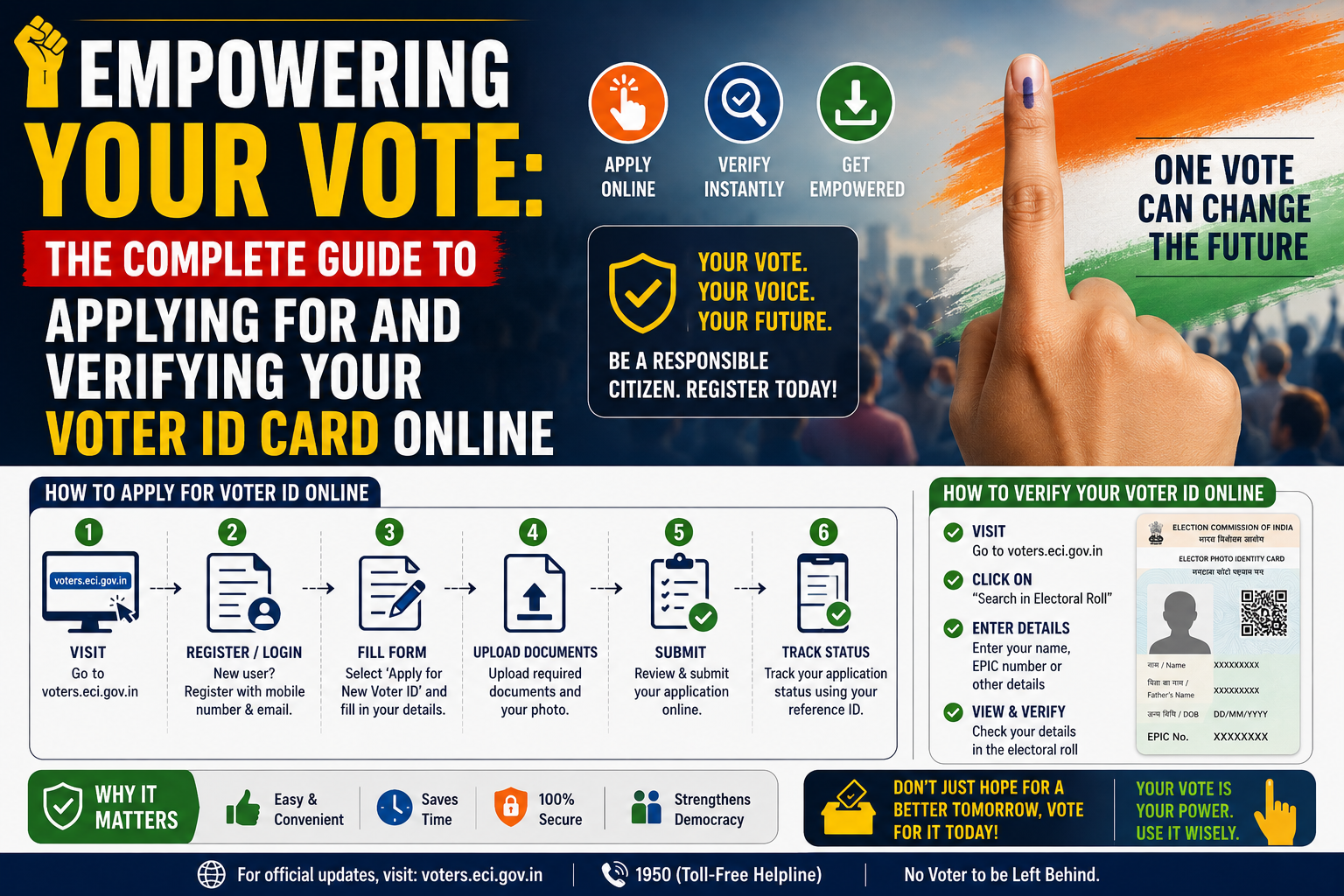
From step-by-step digital registration on the NVSP portal to downloading your secure e-EPIC, take control of your democratic identity.
An Electors Photo Identity Card (EPIC), commonly known as a Voter ID card, is more than just a pass to the voting booth—it is an official government-issued photo identity and address verification document. Issued by the Election Commission of India (ECI) under the Representation of the People Act, 1951, the Voter ID card ensures that every eligible citizen can cast their ballot securely.
Add rightsofemployees.com as a Preferred Source


With the modernization of the National Voters’ Services Portal (NVSP), the entire ecosystem has shifted online. You can now register as a new voter, track your physical card’s delivery status, and even download a legally valid digital version (e-EPIC) to your smartphone without ever stepping into a municipal office.
Recent Posts
- Weekend Special: How to Download Your Birth or Marriage Certificate Online in Minutes
- OnePlus N6 to launch in India on June 30, price and features spark excitement
- Historic Reset: Volkswagen Weighs 100,000 Job Cuts and Four German Plant Closures Amid Chinese EV Surge
- Securing Loved Ones: How the Employees’ Pension Scheme (EPS) Protects Families After a Member’s Death
- EPFO Streamlines Provident Fund Withdrawal Policies, Raises Auto-Settlement Caps, and Details Tax Protocols
Eligibility Criteria for Applicants
Before starting your application, ensure you meet the legal benchmarks established by the Election Commission:
-
Citizenship: You must be a legal citizen of India.
-
Age Limit: You must be 18 years of age or older on the qualifying date.
-
Residential Status: You must have a permanent residential address within India (Non-Resident Indians have specific provisions outlined below).
-
Legal Standing: You must not be disqualified under any standing electoral law due to unsoundness of mind or criminal records.
Required Documentation
To complete your online application, you will need clear, scanned copies of your supporting documents. The platform accepts several standard government records for authentication.
1. Proof of Date of Birth (Provide One)
-
Birth certificate issued by a competent local body or municipal authority.
-
Official Identification Card (such as a PAN card, Driving Licence, or Indian Passport).
-
Statutory Identification documents containing your clear date of birth.
-
Class X or Class XII educational board certificate displaying your date of birth.
2. Proof of Residence (Provide One)
The address proof can be under your own name, or under the name of a parent, spouse, or adult child who is already enrolled at that identical location.
-
Recent utility statements (Water, Electricity, or Gas connection bills at least 1 year old).
-
Official Identity or Property records (Registered Rent Lease Deed, Registered Sale Deed, or Revenue Department land records like a Kisan Bahi).
-
Official financial books (Current passbook from a Nationalized/Scheduled Bank or Post Office).
-
A valid Indian Passport.
3. Photographs
-
A recent, high-resolution passport-sized photograph with a clear, neutral background.
Recent Posts
- Weekend Special: How to Download Your Birth or Marriage Certificate Online in Minutes
- OnePlus N6 to launch in India on June 30, price and features spark excitement
- Historic Reset: Volkswagen Weighs 100,000 Job Cuts and Four German Plant Closures Amid Chinese EV Surge
- Securing Loved Ones: How the Employees’ Pension Scheme (EPS) Protects Families After a Member’s Death
- EPFO Streamlines Provident Fund Withdrawal Policies, Raises Auto-Settlement Caps, and Details Tax Protocols
How to Register for a New Voter ID Online
The quickest path to enrollment is through the digital portal. Follow this step-by-step procedure to file your application accurately.
Step 1 : Account Registration
Navigate to the official sign-up dashboard of the National Voters’ Services Portal (NVSP). Choose the Indian Resident Elector option, enter your active mobile number and email address, solve the captcha security layout, and click continue.
Step 2 : Profile Set Up
Provide your full legal first name, last name, and generate a strong password. Confirm your password selection and hit the Request OTP button to trigger your verification codes.
Step 3 : Mobile & Email Authentication
Check your mobile device and email inbox for the dual verification codes. Enter the correct OTP values into the fields and press Verify to complete your account activation.
Step 4 : Secure Portal Login
Click the login interface, input your registered mobile number, password, and the new captcha challenge. Request a final security login OTP, type it in, and select Verify & Login to open your dashboard.
Step 5 : Fill and Complete Form 6
Locate the New Voter Registration segment and click Fill Form 6. Carefully input your personal specifics, relative details, contact data, statutory details, birth history, and residential location. Upload your scanned documents in the corresponding upload blocks, click Preview and Submit to double-check your text, and hit Submit.
Tracking and Delivery Timelines
Once your Form 6 is submitted, the portal will generate a unique Reference ID on an acknowledgment slip. Save this reference code carefully.
To track your status, navigate to the Track Application Status page on the NVSP, input your reference string, and select your state. This will reveal if your file is currently with the Booth Level Officer (BLO), under field verification, or fully approved. Thanks to updated fast-track distribution systems, physical Voter ID cards are typically dispatched and delivered to your doorstep via speed post within 15 days of formal administrative approval.
How to Download Your Digital e-EPIC
You don’t have to wait for the postman to arrive before you can use your card. A secure, digitally signed PDF version called an e-EPIC can be downloaded immediately upon approval.
| Step | Action Required | Portal Interface Field |
|---|---|---|
| 1 | Open the specialized download tab | Select E-EPIC Download after secure login |
| 2 | Input your search parameter keys | Toggle either EPIC No or Form Reference No |
| 3 | Execute the data query | Type your unique identification number and select your state |
| 4 | Complete final security checks | Click Send OTP and enter the code sent to your registered phone |
| 5 | Save the digital document file | Click Download e-EPIC to pull the valid PDF copy |
Electoral Roll Verification Note: If you want to ensure your printed card is completely legitimate, you can verify it directly against the centralized national rolls. Go to the NVSP portal, select Search in Electoral Roll, and query by your details or EPIC number. If your name populated properly on the screen, your identification is active and valid for upcoming elections. For any structural corrections, you can update your details instantly online by filling out Form 8.
Special Provisions for Non-Resident Indians (NRIs)
Overseas Indian citizens who have not taken up citizenship in any foreign nation are eligible to register as overseas electors using Form 6A. While registration is seamless online, please note that the Election Commission currently mandates physical presence at your assigned domestic constituency polling station to cast a ballot; remote or digital voting capabilities are not operational at this time.
-
FAQ
What should I do if my digital application is approved but the physical card isn’t delivered within 15 days?
If your physical card faces transit delays, use your online reference number on the NVSP tracking page to check the dispatch date. If it shows as dispatched, coordinate with your local post office. In the meantime, you can download the digital e-EPIC PDF, which contains a valid validation QR code and is legally accepted everywhere.
Can I apply for a new Voter ID card if I move to a completely new state?
Yes. If you change your residence permanently across state boundaries, you do not need to cancel your old card manually. You can log into the Voters’ Services Portal and fill out Form 8 for transposition or shifting of residence. The system will automatically update your electoral records and allocate you to the correct new constituency.
Is a digital e-EPIC downloaded via DigiLocker considered a valid identity proof at airports?
Yes. Digital documents pulled directly into DigiLocker or downloaded with an official digital signature from the ECI portal are legally recognized on par with physical plastic cards across domestic transport hubs, financial institutions, and government offices under the IT Act.
What happens if there is an error in my father’s name on my newly issued Voter ID card?
Naming errors can be corrected completely online. Log in to the NVSP portal, select the Form 8 module for correction of entries, fill in the correct spelling, and upload an official matching document (like a passport or school certificate) as supporting evidence. A Booth Level Officer will review and update the database.
Recent Posts
- Weekend Special: How to Download Your Birth or Marriage Certificate Online in Minutes
- OnePlus N6 to launch in India on June 30, price and features spark excitement
- Historic Reset: Volkswagen Weighs 100,000 Job Cuts and Four German Plant Closures Amid Chinese EV Surge
- Securing Loved Ones: How the Employees’ Pension Scheme (EPS) Protects Families After a Member’s Death
- EPFO Streamlines Provident Fund Withdrawal Policies, Raises Auto-Settlement Caps, and Details Tax Protocols
Add rightsofemployees.com as a Preferred Source